Insha'a · إنشاء · construction. creation. infrastructure.

The future of work is here.

Insha'a builds the AI operating system your business runs on. All of your internal knowledge in one place, with agents built on top that finish real work.

Most AI knows nothing about your business, so it never really helps. Ours is built on your clients, your voice and how you work, which is why the work it does is ready to use.

30 minutes. No pitch deck. No commitment.
Running nowFeedback consolidator · 23 client comments merged into one revision list · 02:14
The Command Centre

This is the one we run Insha'a from. Click around.

Every client gets their own branded back office, in their name and colours. This is ours, with sample data. Everything the business knows sits in one place, and the agents on top do the work in the background.
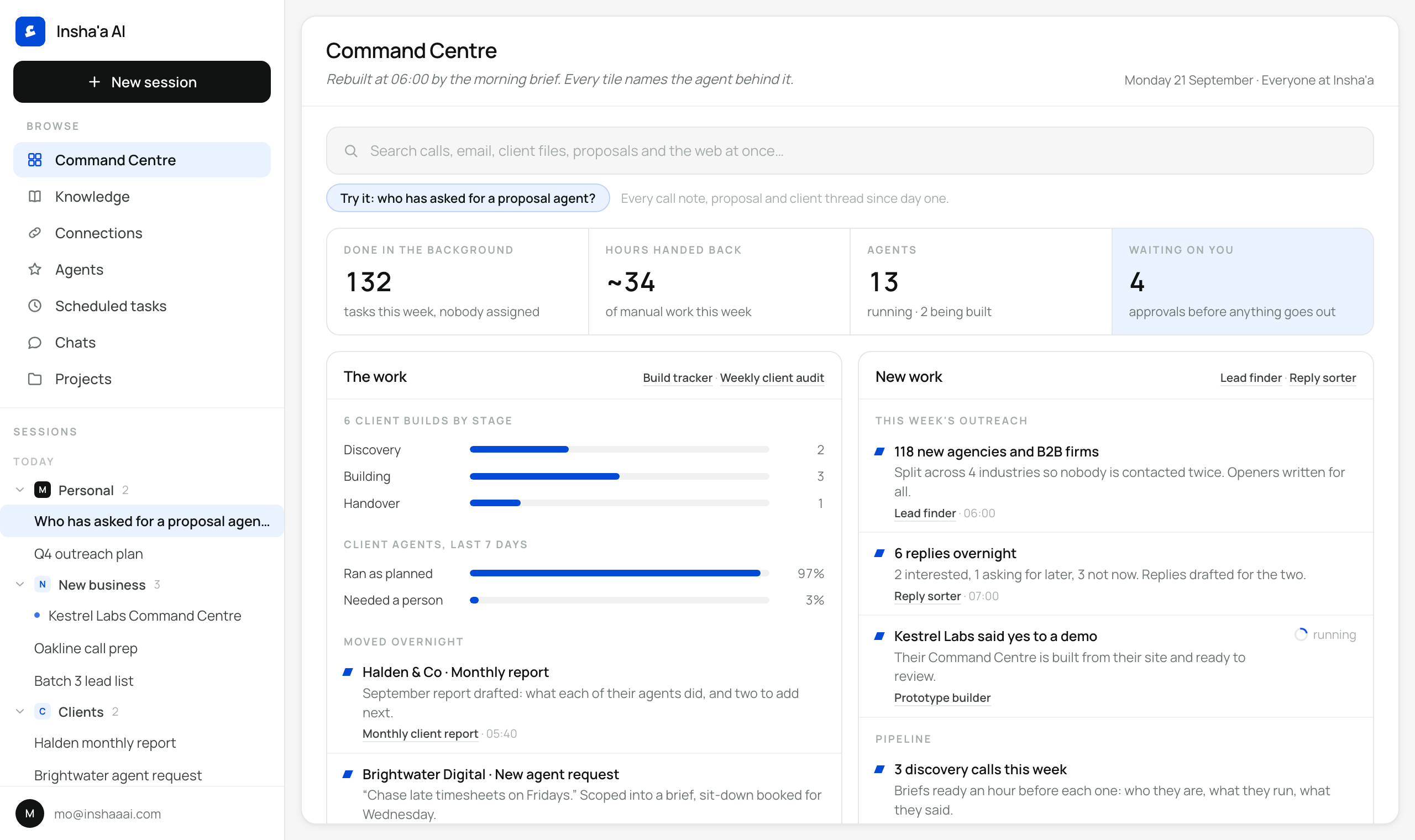
01Try the searchAsk who has asked for a proposal agent.
02Open AgentsClick any one to see how it works and what it made.
03Request a new oneDescribe a job in a sentence.
inshaaai.com / command-centre
Clients, activity and figures are sample data. The shape is what every client gets.
How it works for your team

Everything in one place. Agents on top. Your team in charge.

We connect everything your agency knows to the tools you already use, then build agents on top that take on the work people do by hand today.

/ 01
Everything in one place
The knowledge
Every file, email, call note and past project, connected into one place your agents read from before they act. Your clients, your voice and how you work, held as structured memory that grows every week.
/ 02
Agents built with your best people
The work
We sit with whoever does each job best, learn how they do it, and build an agent around it. It runs in the background on a schedule, or the moment your team asks.
/ 03
Your team runs it
The Command Centre
Everyone sees what each agent did and what it produced. Tweak one in a sentence, approve anything before it leaves, and request a new agent whenever a job comes up.
Need an agent for something else?
Describe the job in a sentence. We build it with whoever does it best, and it appears in your Command Centre to review before it runs.
See it in the demo →
Agents for the whole agency

Two tracks. Winning the work, and running it.

Every agent is specific to your business and built around how your team works. These are the kind we build for agencies and B2B services firms.

Winning new work
/ 01
Finding it, pitching it, closing it.
Lead finderRuns on its ownWeekly
Builds a fresh list of the companies and people worth contacting each week, from live searches that match your ideal client.
Cold email campaignsAsks firstDaily
Writes a personal first line for every lead, picks the right email, and keeps each campaign sending on schedule.
LinkedIn outreachAsks firstDaily
Drafts connection requests and follow-ups for each person on the sales team, in their own voice, ready for them to send.
Reply sorterAsks firstHourly
Sorts every reply to your outreach and drafts an answer for anyone interested.
Call prep briefRuns on its ownBefore each call
One page before every call: who they are, what they run, and what they said last time.
Credentials builderRuns on its ownWhen asked
Picks the right case studies for each brief, in the right order, in your format.
Proposal drafterAsks firstWhen asked
Turns call notes into a phased scope, priced from the hours similar jobs actually took.
Running the work
/ 02
Delivering it, on time and on scope.
Feedback consolidatorRuns on its ownWhen feedback arrives
Merges client comments from email, chat and marked-up PDFs into one revision list per round.
Approval chaserAsks firstTwice a week
Follows up on work waiting for sign-off, in the account manager's tone and the client's language.
Scope and hours watchRuns on its ownDaily
Flags any project at 80% of its hours before the next invoice goes out.
Weekly studio reportRuns on its ownWeekly
Every project, every deadline at risk and who is stretched, before the week starts.
Monthly client reportAsks firstMonthly
What you delivered for each client this month, drafted and ready to review.
Handover pack builderRuns on its ownWhen a project closes
Checks every deliverable in the scope is there before the client ever sees it.

Anything that sends, submits or pays asks a person first. Everything else runs in the background and shows up in the Command Centre with its output.

Under the hood

Four layers, built in order.

Every branded back office runs on the same four layers. We build them in this order, because agents are only as good as the knowledge and connections underneath them.

/ 01
Context
The knowledge layer
Everything your business knows: docs, call notes, decisions and past work, held as a second brain every agent reads before it acts.
/ 02
Connections
The reach layer
Live links into the tools you already run: email, calendar, CRM, drive, project and finance tools.
/ 03
Capabilities
The action layer
End-to-end automations and agents that draft, file, update, chase and report across those tools.
/ 04
Cadence
The clock
The schedule they run on, so the work gets done in the background of your week.
ThenWe keep tuning it: audits every week for the first 60 days, then monthly, with new automations added every month.
How we build it

From first call to a running back office in weeks.

01
Discovery call
We learn how your agency wins work and delivers it, which tools you run, and where the hours go. One call, no questionnaire.
02
Scoped proposal
A written proposal: the workflows to start with, what connects, the first agents, and the package that fits.
03
Build
We build the four layers in order, sitting with the people who do each job best. You stay in the loop without having to drive.
04
Handover and ongoing care
A walkthrough and training for the team. Then audits, new automations every month, and support as the business changes.
Built with your team, based on how the work gets done today.
Book a discovery call
Packages

Two packages. The same operating system underneath.

Both are built for agencies and B2B services firms, and both come with the Command Centre. The difference is how much of the business it covers. Investment is set on the discovery call.

For smaller teams

Foundation OS

Your core workflows first. The tools your team lives in, connected, with the first agents running at handover. Delivered in about two weeks.

  • Up to 10 tool connections
  • 7 to 10 end-to-end automations and agents
  • Your branded back office and Command Centre
  • Walkthrough and training call for the team
  • Up to 3 new automations a month, weekly audits for 60 days, then monthly
Investment
Scoped on the call
Book a call
For agencies and software teams of 5 to 50

Architecture OS

The whole business, across every team. Every data source connected and a second brain the whole team shares. Delivered in three to four weeks.

  • Unlimited connections
  • A second brain across the whole team
  • 15 end-to-end automations and agents
  • Two onboarding sessions and a full SOP library
  • Up to 8 new automations a month, weekly audits for 60 days, then monthly check-ins
Investment
Scoped on the call
Book a call
About the work

Built from inside a working B2B business.

MA
Mo Abusin
Founder · Insha'a AI

Before Insha'a, I built AI tooling inside a B2B company. Wiring real workflows into it, day after day, taught me what works, what breaks, and where the time actually comes back.

Most teams use AI the way they used search in 2005: open a window, type a question, paste the answer back into the real work. The value sits in the layer underneath. What the business knows, the tools it runs, and agents doing the work on a schedule while nobody is at their desk.

I started Insha'a to build that layer for agencies and B2B services firms. Every agent is built with the person who does the job best, and your team runs all of it from one Command Centre.

ء Insha'a (إنشاء), Arabic for construction, creation, establishment.
Questions

Common questions.

Don't see yours? Ask it on the call, or email me and I'll send a written answer.

mo@inshaaai.com →
A connected system your business runs on. Everything your team knows sits in one place, your tools are connected to it, and automations and agents run on top on the schedule you set. Your team works from one branded back office, and its home screen is the Command Centre.
An automation is a repeatable job done the same way every time: file the call notes, send the weekly report. An agent handles a whole job that needs judgement, reading across your knowledge and tools, like turning a client's feedback from five places into one revision list. Your system comes with both.
All of it. Everything the agents do shows up in the Command Centre: what ran, what it produced and what is waiting on a person. Anything that sends, submits or pays asks first. You can pause any agent, and change how one works by telling it in a sentence.
Yes, and they should. Describe the job in a sentence from the Command Centre. We sit down with whoever does it best, build it around how they work, and it appears in the Command Centre to review before it runs. Both packages include new automations every month.
Yes. It runs in your own accounts, in your name and colours, and everything your business knows stays yours.
The tools agencies already run: Google Workspace, Slack, HubSpot, Notion, ClickUp, Asana, Figma, Xero and most things with an API. If we can read from it or write to it, it can be connected.
Good. We connect them in and build around them, so whatever your team already relies on becomes part of the system.
The first agents usually run during the build. Foundation OS is delivered in about two weeks, Architecture OS in three to four. From there it gets sharper as new agents land and the knowledge grows.
Ongoing care keeps it running and growing: weekly audits for the first 60 days, then monthly, new automations every month, and support whenever you need it.
30-minute discovery call · no pitch

Your agency, in one place.
With agents doing the work.

Thirty minutes on how you win and deliver work, and what your own Command Centre would look like. No deck.